problem visualizing my steering wheel angle in Motec

Hello,
I hope I opened this topic in the right place. Otherwise, let an administrator or moderator move my topic to the right place. Thanks in advance.
I have Motec I2 Pro which I use with Iracing via mu installer for converting IBT files to Motec.
In Motec, I visualize the telemetry of my laps very well, only I don't see the curve of my steering wheel angle which is completely flat. On other telemetry software, I see this curve, not in Motec.
Does anyone have an idea to resolve this issue?
Thank you in advance for your help.
-
Hi,
Can you post a sample of the logfile?
We can have a look at it to see what channels are visible and how they are presented, but as this is a ld file generated by an un-licenced third party product our options are limited in the support that can be provided.
0 -
Good morning,
Thank you already for responding to try to help me.
I'm not sure which "logfile" you're talking about, but I've already provided you with some screens which I hope will help you see my problem more clearly.It is certain that "mu installer" can be the cause of this problem in its conversion from IBT to Id/Idx, because, as already mentioned, I don't encounter this problem with other telemetry software.
But before blaming "mu installer", I want to eliminate the possibility of a display problem on Motec. Hence my topic.
I obviously remain at your entire disposal if you need any further information.
Thank you.

 0
0 -
Hi,
The logfile being the ld file that you open in i2.
Looking at the screen captures, it doesn't look like the selected Steered Angle (typically a calculated angle showing the angle that the front wheels are steered to relative to the steering wheel angle) channel is present in the log data. Steered Angle and Steering Wheel Angle are two different channels as well, so you could have data in the Steering Wheel Angle channel, but unless you add that channel to the time graph, it will not show as there is not a match to the requested channels that are currently visible in the time graph.
0 -
Thank you for taking the time to try to help me, but now it's getting too complicated for my little brain.
I'm going to uninstall Motec i2 Pro, and use another telemetry software with which I know I can see my steering wheel angle.
Maybe it comes from my installer which does not convert IBT files from Iracing correctly but as I don't know of any other software for converting IBT files to Motec, I uninstall Motec.Thank you again for your patience.
0 -
If you hover your mouse pointer over the Channels list on the left hand side of the i2 screen, this will show you what channels are available in the log file, scroll through here and see if there is a Steering channel. If there is, either drag and drop it or double click it on it to make it visible in the Time Graph.
0 -
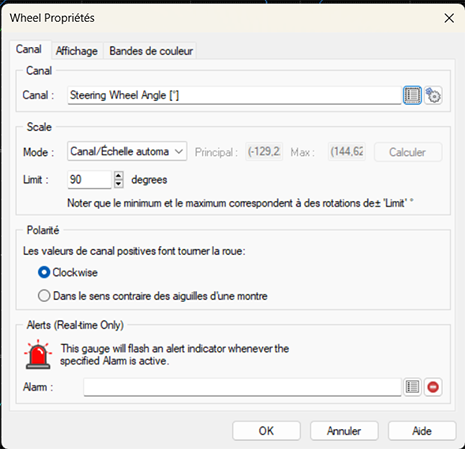
I found steering wheel angle in the long list of channels but even clicking on it didn't change anything. :(
 0
0 -
Just to make sure, have you tried both potential channels which are in your list:
*) Steering Wheel Angle
*) SteeringWheelAngleOne is with spaces between words, the other is without:
(attachment: 2x SteeringWheelAngle.png)
Otherwise as mentioned before feel free to upload the .ld log file which you are using, attach it here to the forum post, so that others can have a look at it and possibly help you.
2x SteeringWheelAngle.png0 -
Did you just click on it or did you double click on the channel name? Doing so adds or removes the channel from the time graph.
0
Please sign in to leave a comment.
Comments
8 comments